Opokproject.net – Sobat opokproject Android adalah salah satu sistem operasi yang banyak digunakan oleh vendor smartphone. Hampir semua kalangan usia banyak memakai smartphone dengan sistem operasi Android, karena lebih mudah dalam hal pengoperasian ketimbang OS lain, seperti Windows Phone dan juga iOS. Bagi anda pengguna smartphone Android yang ingin menikmati internet gratis tanpa harus beli pulsa dan juga kuota lewat, mungkin anda bisa mencoba aplikasi yang akan kami bagikan dikesempatan kali ini. Aplikasi android internet gratis ini bisa dicoba oleh semua operator seluler, seperti XL, Three 3, Smartfren, Telkomsel, Indosat, Axis dan lain sebagainya.
Aplikasi internet gratis di Android ini sangat mudah di gunakan. Aplikasi internet gratis sendiri ada banyak sekali, nah untuk anda yang bingung untuk memilih aplikasi internet gratis terbaik, kami membawakan beberapa daftar aplikasi internet gratis terbaik versi opokproject sebagai berikut:
1. Http Injector
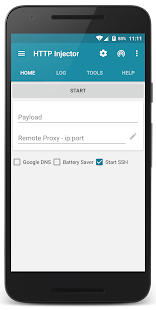
Yang pertama adalah aplikasi Http injector. Aplikasi ini sangat populer di kalangan pengguna internet gratis, karena sangat mudah penggunaannya dan banyak sekali fitur yang tersemat di dalamnya. Kurang lebih sebagai berikut fitur yang ada di aplikasi ini:
Features:
- Secure your connection using SSH tunnel
- Modify outgoing requests.
- No root needed [Choose between VPN mode or iptables (root)]
- Specify alternate proxy servers to send a request through
- Provide alternate headers and ability to strip headers from incoming http responses
- Build in Host Checker and IP Hunter
- Build in SSH client (Similar to Bitvise)
- Payload Generator
- Support Android 4.0 to Android 7.0
- Google DNS / DNS Proxy
- Data Compression
- IP Route
- Battery saver
- Ability to change buffer size, etc
Provider Mode
- Exported config is encrypted
- Lock and protect the settings from users
- Set custom message for customer
- Hardware ID lock
How to use:
Import config file created by other users (You can find it in your local group/group chats)
or
Use payload generator with normal mode if you don't know how to write the payload
Method 1 (SSH)
- Fill in proxy and SSH server info and press start
Method 2 (VPN)
- Uncheck "Start SSH" and fill in payload & proxy and press start
- On your VPN, set it to listen 127.0.0.1:8989
Example for OpenVPN:
You have to add http-proxy 127.0.0.1 8989 and bypass route route replace_to_your_remote_proxy_ip 255.255.255.255 net_gateway (change "replace_to_your_remote_proxy_ip" to IP) to your VPN config.
2. KPN Tunnel

Untuk penggunaan sangat mudah sekali apalagi untuk pemula, kurang lebih sebagai berikut fitur yang tersedia di aplikasi KPN Tunnel:
FEATURES :
- Customizing HTTP Request / Payload with command (see About for information)
- Surfing with secure connection through SSH Tunneling (OpenSSH / Dropbear)
- Forwarding all connection through VPN Service (no root) and Global Proxy (need root)
- Support Customize DNS Address for unblocking connection from ISP.
- Support UDP Protocol (Voice Call/ Video Call/Broadcast) but SSH Server need UDPGW from BadVpn
- Support HTTP Proxy / Squid & Direct Method (without proxy).
- etc.
This is Advanced Tools to customize HTTP Request and surfing with secure conection (SSH Tunneling). if you don't know anything don't use it. if you need to know, learn about HTTP Request and Secure Shell (SSH).
NOTE :
- This application contains Ads for support developer.
- On some features need rooted access.
- For other informations, please see About in this Application.
3. KPNTunnel Ultimate
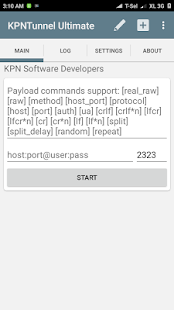
KPN Tunnel Ultimate masih saudara sama Kpntunnel tapi memiliki fitur yang lebih komplit, untuk penggunaan lumayan sulit buat pemula karena banyak fitur Unggulan yang tersembunyi di aplikasi ini. Tapi kalau sudah terbiasa pasti akan sangat nyaman menggunakan aplikasi Ini, karena sangat komplit fiturnya kurang lebih sebagai berikut:
# Features:
+ Customize HTTP Request with some replacer commands.
+ Direct Mode (No Remote Server).
+ Socket Buffer Size Tweaks can editable manualy.
+ Auto Data Reconnect. Disconnecting and Connecting Mobile Data with time interval.
+ Ip Finder, find your specified ip. support x variable for all values.
+ Multi Login/Multi Server Login in built-in SSH Tunnel managed by Profile.
+ Data Compression for more speed and acceleration your data Transfer.
+ Udpgw (from badvpn) support for handling UDP through SSH Server with TCP Protocol.
+ Customable DNS Server for more anonymoity.
+ Exlude Ip from Vpn Service to not Intercepted.
+ Allow/Disallow Apps to intercepted by Vpn Service or Iptables Mode.
+ more....
# Root Feature:
+ Iptables Mode if not use Vpn Service (Deprecated)
+ Wifi Tether/Hotspot to force Intercepted by Vpn Service.
+ Auto Data Reconnect. Only API 21 and up to need Rooted Access.
#NOTE :
- Some feature is Unstable like Multi SSH Server on some device Memory Leak Issue.
Demikianlah pembahasan kami mengenai Tiga Aplikasi Android Untuk Internet Gratis yang bisa kami sampaikan untuk anda. Dan akan di sambung lagi di artikel selanjutnya untuk aplikasi yang lainnya Nah, untuk anda yang ingin menikmati internetan gratis bisa memilih dari beberapa aplikasi internet gratis diatas yang telah kami sebutkan tadi. Selamat mencoba dan semoga bermanfaat.
EmoticonEmoticon